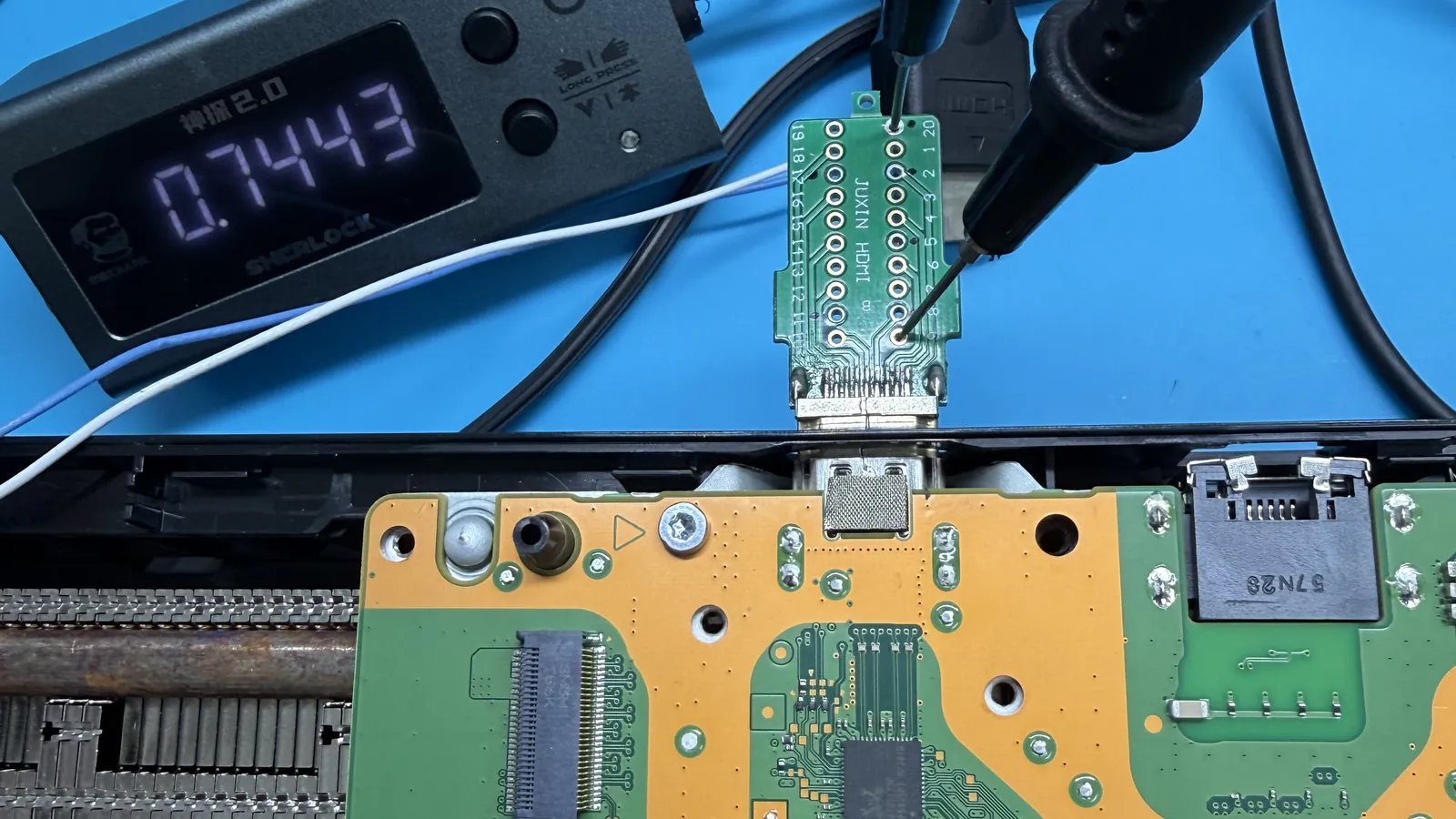
A damaged connector is one of the most common and visible causes of no video, especially after the console falls, the cable gets hit, or the plug is repeatedly inserted at an angle. But a white light with no image does not identify the failed part. It only tells you the console got much farther through startup than one that stays on a pulsing blue light or shuts down.
If the port is intact and its pins give consistent diode-mode readings, the next step is to test the rest of the HDMI circuit, not to apply heat to the board just to see what happens.
What a Solid White Light Tells Us
During a normal PS5 startup, the light pulses blue and turns solid white once the main boot sequence completes. A console that stays white with no picture is therefore different from one that never finishes the blue-light stage.
A white light suggests the console is running, but it does not prove that a valid HDMI signal reaches the television. The failure can still involve:
- The HDMI cable or the television input.
- Dirt, mechanical damage, or worn contacts inside the HDMI port.
- Broken solder joints or torn pads beneath the port.
- An open filter, a damaged protection component, or a shorted line.
- Missing HDMI 5 V, hot-plug detect, or display data (DDC) communication.
- A failed HDMI transmitter or one of its voltage rails.
- Damage left by an earlier HDMI repair.
That is why the light color and the video symptom have to be read together.
Start Outside the Console
Before opening a PS5, the basic external checks still matter:
- Test a known-good HDMI cable.
- Try a different HDMI input on the television or monitor.
- Connect directly to the display, not through an AV receiver, switch, capture card, or soundbar.
- Inspect the port under strong light for bent contacts, a displaced center tongue, or a connector that moves inside the rear opening.
- Measure the HDMI pins in diode mode with the console unplugged, through an HDMI breakout adapter plugged into the port.
- Try Safe Mode with the correct procedure for the console, if its behavior allows it.
The cable, display, and inspection steps rule out problems outside the console. The pin measurement goes further: it shows whether the port itself is the fault before the console is opened.
What HDMI Pin Measurements Can Reveal
This measurement does not require opening the console. With the PS5 unplugged, an HDMI breakout adapter plugged into the rear port exposes every pin of the connector, and a technician can compare diode-mode readings from each signal pin to ground. Diode mode reveals a line that is shorted, open, or clearly different from the rest.
There is no single universal number for every pin. Readings depend on meter polarity, board revision, circuit design, and the components connected to each line. The useful information comes from:
- Comparing related lines with one another.
- Looking for a pin that is shorted to ground.
- Finding an open line that breaks the expected pattern.
- Comparing against a known-good console of the same revision when possible.
- Following an abnormal reading through filters and protection components once the console is open, instead of assuming the port is at fault.
Read correctly, these numbers answer the key question before any disassembly. A damaged contact, a torn pad, or a broken joint under the port shows up as a pin that breaks the pattern, and then the port is the correct repair. If the connector looks intact and every pin follows the expected pattern, the port is not the fault, and replacing it just to test a theory only puts the board at risk. The diagnosis should move farther into the circuit.
The HDMI Port Is Only the Beginning of the Signal Path
PS5 video output depends on more than the rear connector. High-speed differential signals pass through small filters and protection components, and the circuit also relies on control lines, hot-plug detect, display data communication, power rails, clocks, and the HDMI transmitter. A no-video diagnosis may include:
- Continuity from the port to the next component in the path.
- Inspection of the HDMI filters for cracks, missing parts, or damaged solder joints.
- Measuring the 5 V output at the HDMI connector.
- Checking hot-plug detect when a display is connected.
- Verifying the DDC (I2C) communication used to read the display's capabilities.
- Checking voltage rails and clock activity around the HDMI transmitter.
- Inspecting earlier repair work for bridged pins, lifted pads, or scraped traces.
These checks need a circuit-level understanding of the board, good magnification, and the ability to work around very small surface-mounted parts. They are not part of an ordinary port swap.
A Newer PS5 Slim HDMI Transmitter: RTD2175P
Some newer PS5 Slim motherboards, including the EDM-050, use the Realtek RTD2175P HDMI transmitter. Earlier PS5 designs commonly use the Panasonic/Nuvoton MN864739.
The two chips are not interchangeable. The MN864739 cannot be soldered in place of the Realtek part as a direct substitute, because their electrical requirements and communication configuration differ. A listing may describe a part loosely as a "PS5 HDMI chip", but the board revision and the original transmitter must be identified before anything is removed.
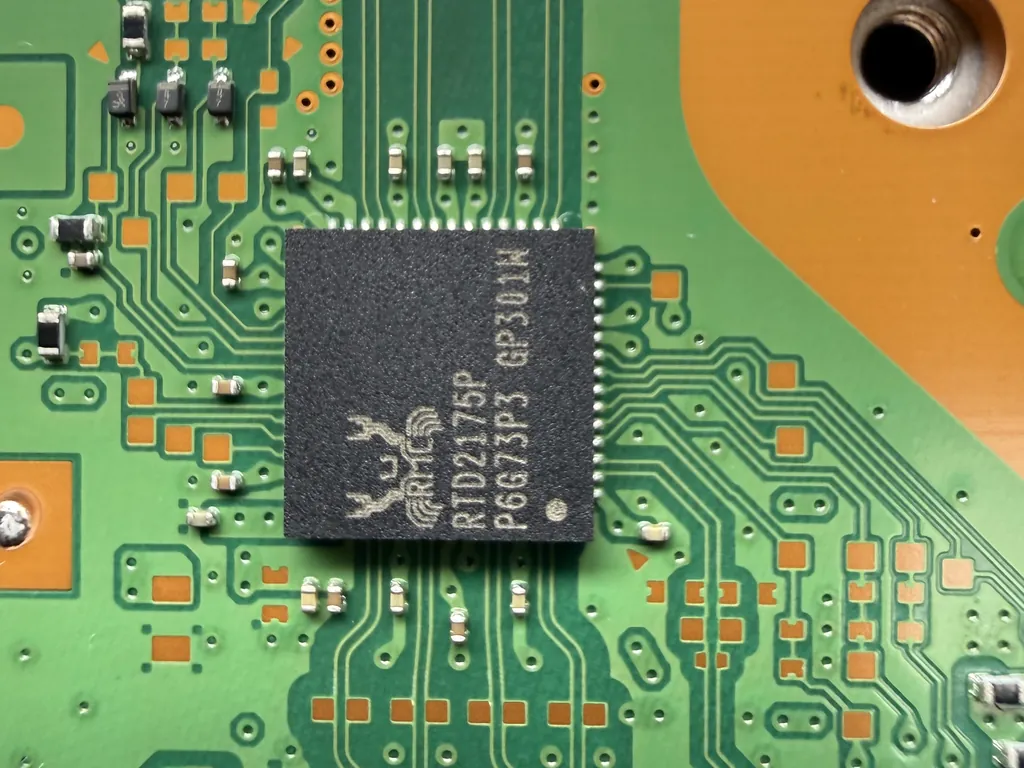
On an EDM-050 board, the factory transmitter should be confirmed from the actual chip marking and board layout. Reference material is useful, but the console on the bench is the final authority.
Can an EDM-050 Be Converted to the MN864739?
A hardware conversion has been developed for boards originally fitted with the RTD2175P, including the EDM-050. It does not make the two chips directly compatible. The documented conversion needs two separate changes:
- A physical and electrical adapter: an interposer maps the different package connections and provides the voltage arrangement the MN864739 needs.
- NOR flash modification: the console's SPI (NOR) data must be backed up and patched so the system communicates with the alternate HDMI transmitter.
The conversion exists because the original Realtek chip can be hard or expensive to source. It is an advanced board-level repair that combines QFN rework, an adapter, voltage considerations, NOR programming, and preservation of console-specific data.
Calling it a "BIOS flash" makes it sound like a normal system update, and it is not. The SPI flash must be read with a programmer, the original dump backed up and verified, the HDMI configuration changed, and the modified data written back correctly, on top of the physical conversion. An incomplete or incorrect conversion can leave the console with no video, a boot problem, corrupted identification data, or a second board-level fault.
When the RTD2175P Should Actually Be Suspected
The transmitter should not be replaced just because the HDMI port tests well. It becomes a stronger suspect when measurements and operating tests point to its local circuit:
- The transmitter's voltage rails are present, but the expected HDMI output is still missing.
- A rail associated with the transmitter is shorted and the short is isolated to the chip.
- The reference clock and supporting circuit have been checked.
- The port, filters, protection components, and visible traces test correctly.
- The board revision and the fitted chip have been positively identified.
- UART logs or current consumption support a communication or transmitter fault.
Even then, the failed part may be a nearby regulator, capacitor, crystal, filter, or communication line rather than the transmitter itself.
Why Replacing the Port "Just in Case" Is Risky
An HDMI port is attached to the motherboard by many signal pins and large mechanical anchors. Removing it takes enough heat to melt every joint without damaging the board, nearby parts, or internal layers. Removing a good port unnecessarily can introduce:
- Lifted or torn signal pads.
- Damaged through-holes at the anchor points.
- Filters or capacitors displaced by heat or tools.
- Bridged pins beneath the replacement port.
- Heat damage to nearby plastic connectors.
- New intermittent connections that did not exist before.
The right order is diagnosis first, rework second. Measurements will not answer every question, but they can keep a mechanically sound port from being replaced when the fault is farther down the circuit.
This Is Not a Universal No-Video Guide
A white light with no video can have more than one cause, and a full diagnosis may need equipment that is not practical at home: an oscilloscope, UART interpretation, current monitoring, comparison with a known-good board, thermal inspection, and microsoldering, depending on what the first tests show.
The point here is narrower: if a PS5 Slim reaches a solid white light and its HDMI pins test normally, the repair should not automatically continue as a port replacement. The next step is to test the rest of the video-output path and identify the exact motherboard revision.
The Bottom Line
"White light, no video" describes a condition, not a component. A damaged HDMI port can cause it, and so can an open filter, a missing voltage, a broken control line, a failed transmitter, or damage from previous work.
On newer boards such as the EDM-050, the HDMI circuit may use the Realtek RTD2175P instead of the MN864739 found in earlier revisions. Those chips are not direct substitutes, and converting the board to the older transmitter takes hardware adaptation plus SPI/NOR reprogramming. If the port looks good and its pins test normally, replacing it anyway is not a diagnosis.
Need a PS5 HDMI Repair in Hialeah?
If your PS5 or PS5 Slim reaches a white light but shows no image, Star Phone Fix can inspect the HDMI port at its Hialeah shop and test the surrounding circuit to find whether the fault is in the connector, the filters, the transmitter, or another part of the board. Our PS5 HDMI Repair page covers the port and board-level HDMI work we do in-house for customers across Miami-Dade.
Frequently Asked Questions
What does a solid white light with no video mean on a PS5?
It means the console finished its main boot sequence but no valid picture reaches the display. The cause can be the cable, the TV input, the HDMI port, a filter or protection part, a missing 5 V or control signal, or the HDMI transmitter. The light alone does not identify the failed part.
Should I replace the HDMI port if my PS5 has no picture?
Only if inspection or measurements point to it. A bent, loose, or visibly damaged port, or a pin with an abnormal reading, justifies replacement. If the port is intact and every pin tests normally, the rest of the HDMI circuit should be tested first to avoid unnecessary heat on the motherboard.
Can the MN864739 replace the RTD2175P on a PS5 Slim?
Not directly. The chips have different packages, voltages, and communication settings. A conversion exists for boards such as the EDM-050, but it requires an interposer adapter and reprogramming the console's SPI (NOR) flash after backing it up. It is advanced board-level work, not a simple chip swap.
Can a PS5 HDMI port be tested with a multimeter?
Yes, and without opening the console. With the PS5 unplugged, an HDMI breakout adapter plugged into the port gives access to every pin, and diode-mode readings to ground reveal shorts, open lines, or a pin that breaks the pattern. Read correctly, they show whether the port is the problem before anything is replaced.