How to Troubleshoot a PlayStation 5 (Step-by-Step)
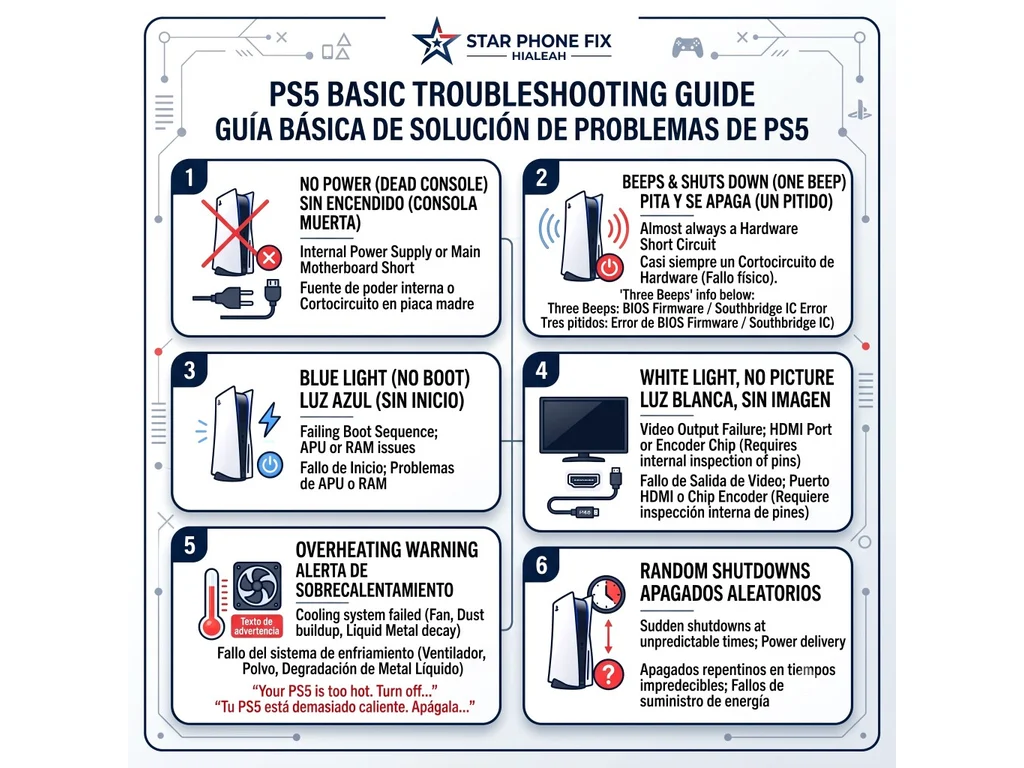
To figure out what is wrong with your console, follow this simple diagnostic flow. Press the power button on your PS5 and observe exactly what happens:
- If there is no sound and no light: The issue is likely the internal Power Supply (SMPS) or a main motherboard short.
- If it turns on, beeps, and turns off: Listen to the beeps. One beep almost always indicates a short circuit, which is a major hardware problem. Three beeps point to a software (BIOS) or main chip (Southbridge) error.
- If it stays on with a blue light: The console is failing its boot sequence, often due to APU or RAM issues on the motherboard.
- If it stays on with a white light, but there is no picture: The console is working, but the video output is failing (HDMI port or Encoder).
- If it displays an overheating warning: The internal cooling system is failing to dissipate heat.
- If it turns on but shuts down randomly without warning: The console might turn off right at the beginning or run for an unpredictable amount of time before suddenly dying.
Understanding Your PS5's Symptoms
No Power (Completely Dead)
If you press the power button and get absolutely zero response, your first suspect should be the power supply. This is incredibly common after heavy thunderstorms, lightning strikes, or severe power surges in your home. A surge can blow the internal fuses or create a direct short on the motherboard's stand-by voltage lines.
The Console Beeps and Shuts Down
The PS5 uses beep codes to tell you where the motherboard is failing:
- One Beep: Almost always indicates a short circuit, which means there is a physical hardware problem on the motherboard that requires repair.
- Three Beeps: Typically points to a communication error on the board, such as a corrupted BIOS firmware or a failure in the Southbridge control chip.
White Light but No Picture (Black Screen)
If your PS5 powers up to a steady white light but your TV says "No Signal," the issue is the video connection. This is rarely a random failure; it usually happens after a console falls or an HDMI cable is yanked. If the physical HDMI port is visibly broken, it requires replacement. However, even if the port looks perfect from the outside, it could have an internally damaged or disconnected pin that only an internal inspection can reveal. If the port and all of its hidden pins are truly intact, the issue is usually the "HDMI Encoder", a specific chip on the motherboard that translates the video signal.
The Overheating Warning Screen
If your screen displays the exact message: "Your PS5 is too hot. Turn off your PS5 and wait until the temperature goes down.", the console is triggering a thermal shutdown. This does not always mean the fan is spinning incredibly fast. In fact, if the fan is broken, clogged with heavy dust, or unable to spin properly, the console will quickly overheat in silence. Another common cause is the degradation of the liquid metal used to cool the processor, which requires a complete teardown to fix.
Random Shutdowns
When a PS5 powers on but dies without warning, the timing is often the clue. Some consoles shut down within seconds of booting; others run for minutes or hours before cutting out. That unpredictable pattern usually points to unstable power delivery, a failing SMPS, or a motherboard fault that only shows up under load. Because the symptom can overlap with overheating or short-circuit failures, observing when the shutdown happens helps narrow the diagnosis before any internal work begins.
Opening a modern console without experience can easily turn a minor issue into permanent motherboard damage. If your PS5 shows any of these symptoms, a careful board-level diagnosis is safer than guessing. For PS5 hardware work on the bench, our PlayStation 5 repair page covers the issues we diagnose and restore, with details on PS5 HDMI port repair, PS5 power supply repair and PS5 controller repair.